
No more switching tabs or manual resizing. The plugin handles everything: drag and drop, remote upload, and it automatically inserts the codes into the editor.
Key Features:
- One-Click Integration: Just a small code in your HTML and the button appears.
- Auto-insertion: Works perfectly with BBCode, HTML, and Markdown.
- Customizable: You can change the button color to match your site's theme.
- Free Service: Use our infrastructure to host your community's images for free and lifetime.
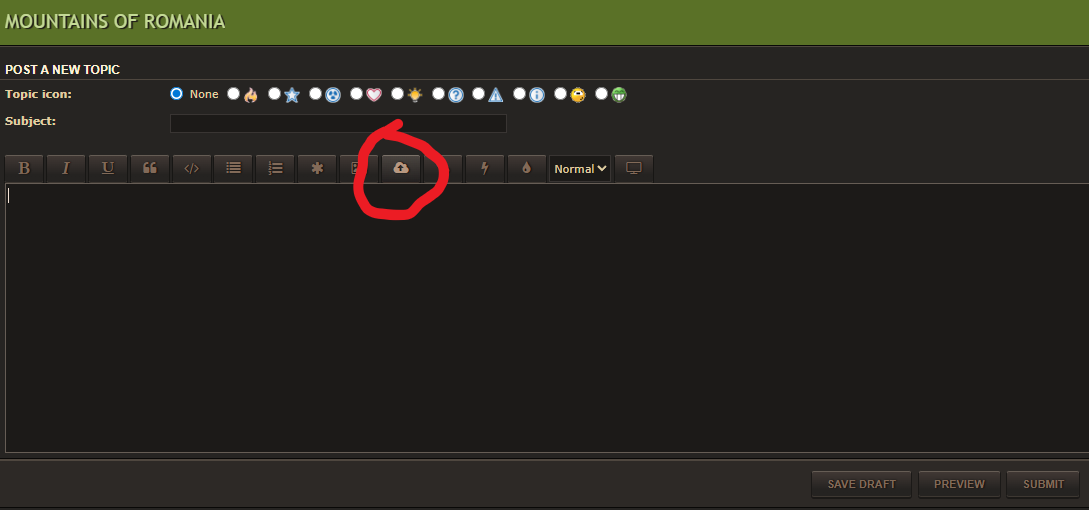
How I implemented it on this forum:
In my case, since this is a phpBB forum, I configured the code in the plugin page configurator (see the page) to return the image link with the full BBCode [img] tag immediately after upload is done (You can configure yourself how is the best for your site). I placed the script in the text editor file (styles/prosilver/template/posting_buttons.html), right under the line "<!-- END custom_tags -->". As you can see in the image, the button was added automatically and fits perfectly with the layout.
This is the code I used:
Code: Select all
<script async src="//beautiful-romania.com/image-hosting/sdk/pup.js" data-url="https://beautiful-romania.com/image-hosting/upload" data-auto-insert="bbcode-embed" data-palette="black"></script>Our Recommendation: BBCode Full
We recommend using BBCode Full for most forums. This option inserts the image directly using the [img] tag, which allows search engines to index the file path immediately and ensures the image displays perfectly in your posts.
Color Palette:
Choose the button color that best fits your website's design and your personal preferences.
Choosing the right code for your site architecture:
Depending on how your website is built, you should choose the embed code that your editor "speaks":
- BBCode (Full/Linked): Best for phpBB, vBulletin, XenForo, MyBB. It’s the standard for classic forum architectures.
- HTML (Embed/Full Linked): Use this for WordPress, custom blogs, or static HTML sites. It uses the <img src="... "> tag.
- Markdown (Full/Linked): Ideal for modern platforms like Discourse, NodeBB, or GitHub-style editors.
- Direct Link: If you just want the simple URL (https://...) to use it manually or in custom scripts.
