This script generates a sitemap that points directly to the image files. By providing the exact path to the files (e.g., /images/2026/03/03/image.jpg), we ensure that Google sees the content immediately and associates it with your domain.
Key Features:
- Direct Indexing: Uses the exact file path to avoid 404 errors.
- Google Image Support: Includes image:image tags for better visibility in Google Images.
- Lightweight: Limited to the last 4000 images to keep the script fast.
- Universal SEO: Valid for all search engines (Google, Bing, Yahoo, DuckDuckGo, etc.).
Don't worry about new or deleted photos! This script generates the sitemap dynamically. Every time the search engine (or you) accesses the link (e.g., yourwebsite.com/sitemap-images.php), the script checks the database and updates the list instantly. It always reflects your current gallery status without any manual work.
How to use:
1. Create a new PHP file in your root folder (name it sitemap-images.php) .
2. Copy the sitemap code on it.
3. Edit it, Update the database credentials (db_name, db_user, db_pass, fileUrl - replace it with your data).
4. Run it once, then submit the link to Google Search Console like yourwebsite.com/sitemap-images.php (It works even is not a .xml file).
- Note: If your database tables don't start with lgpn_ , please change lgpn_images in the code to your actual table name (usually chv_images).
Code: Select all
<?php
error_reporting(0);
header("Content-Type: application/xml; charset=utf-8");

$db_host = 'localhost';
$db_name = 'YOUR DATABASE NAME';
$db_user = 'YOUR DATABASE USER';
$db_pass = 'YOUR DATABASE PASSWORD';

try {
    $pdo = new PDO("mysql:host=$db_host;dbname=$db_name;charset=utf8", $db_user, $db_pass);

    echo '<?xml version="1.0" encoding="UTF-8"?>' . "\n";
    echo '<urlset xmlns="http://www.sitemaps.org/schemas/sitemap/0.9" xmlns:image="http://www.google.com/schemas/sitemap-image/1.1">' . "\n";

    $query = $pdo->query("SELECT image_id, image_name, image_extension, image_date, image_title FROM lgpn_images WHERE image_is_approved = 1 ORDER BY image_id DESC LIMIT 4000");

    while ($row = $query->fetch(PDO::FETCH_ASSOC)) {
        $name  = $row['image_name'];
        $ext   = $row['image_extension'];
        $title = htmlspecialchars($row['image_title'] ? $row['image_title'] : $row['image_name']);

        $folderPath = date("Y/m/d/", strtotime($row['image_date']));

        // Direct photo url - Never get 404 error if the folder is sett right. usually the folder name is "/images/" example link: https://yourwebsite.com/images/
        $fileUrl = "https://YOURWEBSITE.COM/images/" . $folderPath . $name . "." . $ext;

        echo "  <url>\n";
        // We use photo url. Google will index perfect!
        echo "    <loc>$fileUrl</loc>\n";
        echo "    <image:image>\n";
        echo "      <image:loc>$fileUrl</image:loc>\n";
        echo "      <image:title>$title</image:title>\n";
        echo "    </image:image>\n";
        echo "  </url>\n";
    }

    echo '</urlset>';

} catch (Exception $e) {
    echo "";
}
?>
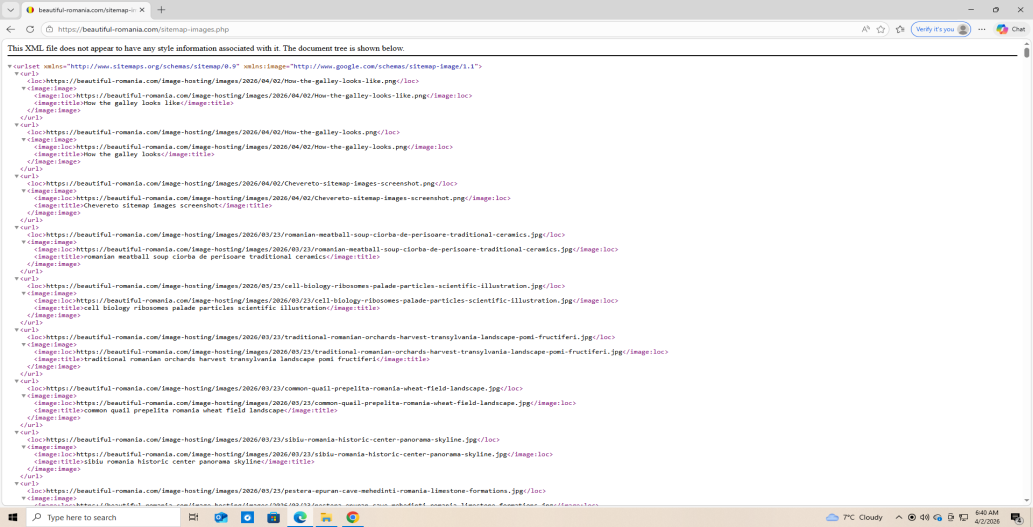
Below I let you a screenshot of how the sitemap script generate links (for my site in this case).
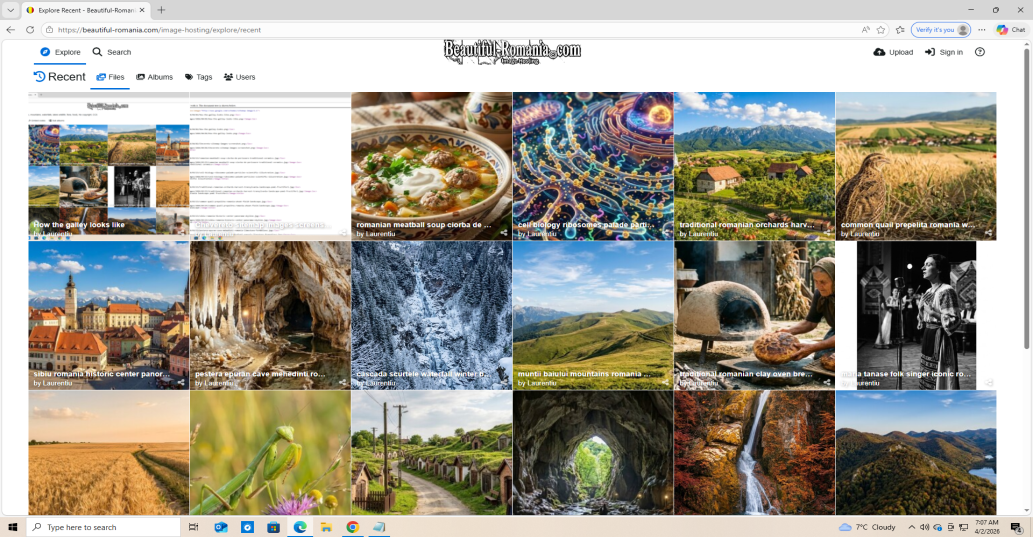
And a screenshot of how the sitemaped site photo gallery looks like: